
Replay & Runs
Replay a script with one click: deterministic Playwright execution at zero LLM cost (only self-healing consumes a few tokens), ideal for daily regression.
A real replay end to end: Run Current Version → live progress → per-step detail in Run Records
Run entries
- Case detail → Run Current Version, or the Run button on a script version row (headless toggle and login config available).
- Case list → row action Run runs the default script version directly.
- You can stop a run in progress; cases have a default script version (the Version column in the case list) for bulk regression.
The run process
Clicking Run shows a Run Progress card on the case detail (with a Stop button) streaming per-step logs:
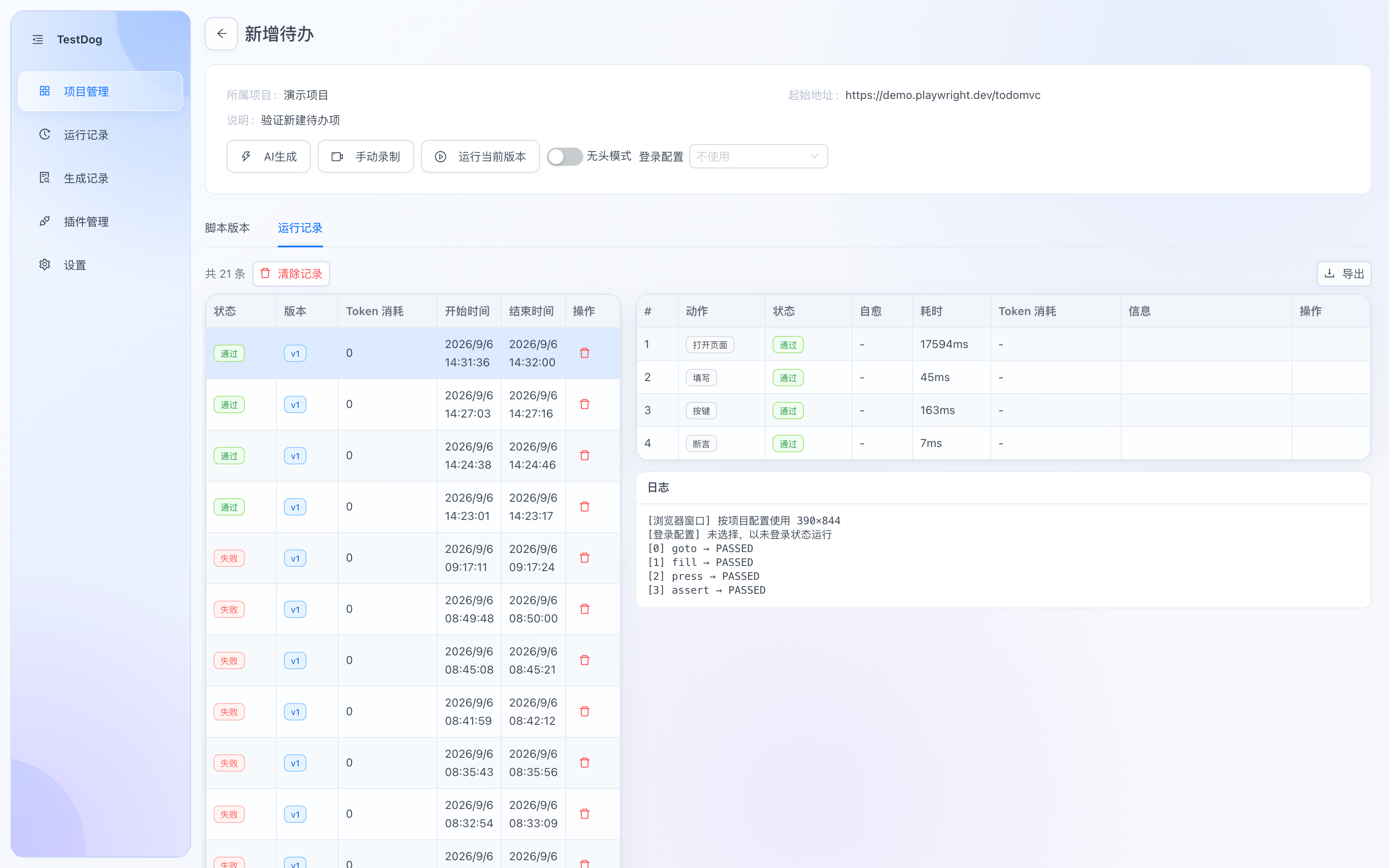
Run detail: per-step status (passed/failed), self-healed flag, duration, token usage and the run log
When the run finishes, open the Run Records tab (or click View detail in the global Run Records menu) for the full breakdown:
- Per-step table: action, status (passed/failed), self-healed flag, duration, token usage, message.
- Run log: browser viewport, login-config state, and each
goto / fill / press / assert → PASSED/FAILED. - Failure diagnostics: failed steps save a screenshot automatically and collect browser console and network logs.
- Export (top right): results as JSON / Excel (test report).
Assertion types
| Category | Assertion | Notes |
|---|---|---|
| UI | Element visible | Waits for the unique target (auto-wait, up to 10s) |
| Element hidden | Hidden or absent; multiple matches error out, not counted as hidden | |
| Text contains | Visible text within scope contains the expected substring | |
| Text exactly equals | Equals the expected text after whitespace normalization | |
| Field value equals | Form field value equals exactly (empty string allowed) | |
| Checked / unchecked | Control checked state | |
| Enabled / disabled | Control enabled state | |
| Matched element count | Number of matching nodes, hidden included, 0 supported (for collection / absence assertions) | |
| URL contains / equals exactly | Current URL contains the substring / equals the expected URL | |
| API | Status code | Status of the latest response matching a URL keyword |
| Response body | Body contains the expected substring | |
| JSON field | Reads a field by JSON path (e.g. data.items.0.id) and compares | |
| WebSocket | Sent message | Matches a client-sent WS message |
| Received message | Matches a server-pushed WS message |
UI assertions share the same semantics as AI generation, retried within a timeout budget; a parent scope can narrow the search (the scope itself must exist uniquely, so a lost scope can't fake a pass).
Locating API/WS traffic
locator.value holds a URL keyword substring (e.g. /api/login); the engine matches the most recent response/frame whose URL contains it.
Unique test data
{{var}} placeholders support system variables (random phone/email/ID numbers) and project environment variables, generating unique test data to avoid dirty-data collisions like "phone already registered". See Test Data & Login for the variable list and rules.
Self-healing
- For ordinary actions other than
uploadandscroll, when a selector no longer matches (e.g. after a frontend redesign), replay automatically switches to AI self-healing using the step's natural-language instruction, then continues. - Self-healed locators can be written back to the original script with one click, effective for the next run.
- Assertions are never self-healed: a failed assertion may be a real product defect, and re-targeting would turn it into a pass — failures are kept as-is for you to judge.
Review & export
- Run list and per-step details live under Run Records (see Run records): per-step status, duration, failure screenshots and console/network capture.
- Results can be exported as JSON / Excel (test report).
Uploads, scrolling and scoped targets
uploadresolves project file IDs, checks original bytes, then selects files through a file input or a button-triggered chooser. Removing a file tag does not break existing replay. Imported v2 packages remap IDs automatically; assert the business outcome after selection.scrollreplays page/container movement or scrolls a mounted element into view using the saved parameters. Current-end detection is not an assertion that an infinite list is exhausted.locator.scoperestricts target lookup to a parent DOM container. Keep the parent unique; UI assertions check that scope exists uniquely. Edit/pick/remove the scope in the step table.- Upload, scroll and assertion steps do not use generic AI self-healing. Inspect the failure and correct the file, locator or parameters before rerunning.