
AI Script Generation
Describe the test in natural language and TestDog executes it in a real browser, step by step, turning each action into script — visible, interruptible and resumable. Before running, the model agrees with you on a test intent and acceptance criteria: generation only completes once every required criterion has a real passing assertion behind it.
A real full generation: send → plan confirmation → start execution → step-by-step write-back → done
Starting a generation
Click AI Generate on the case detail to open the generation page:
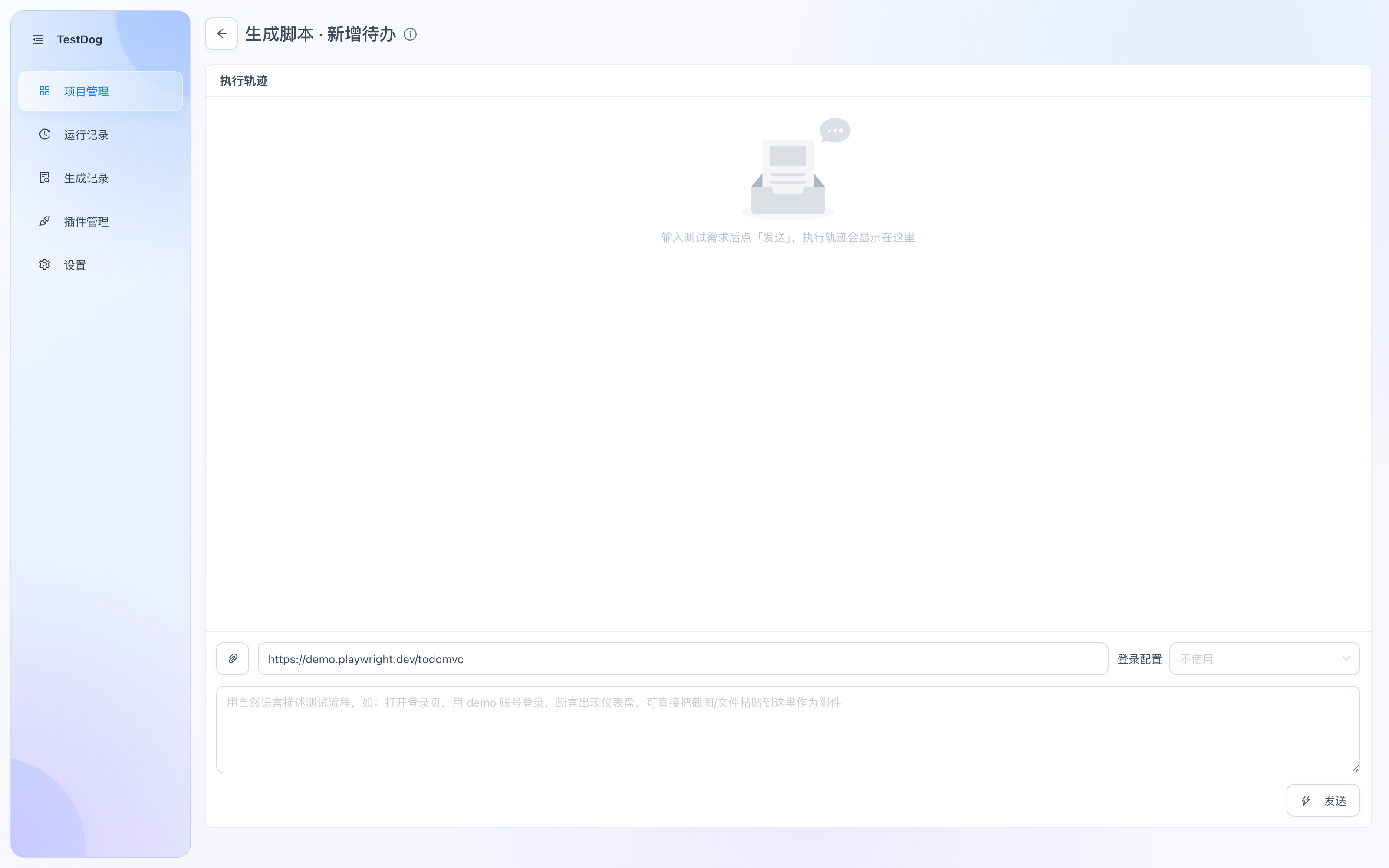
Generation page: execution trail on top, requirement input at the bottom
- Fill in the start URL (defaults to the project's URL).
- Describe the test requirement in natural language.
- Optionally:
- Attachments: drop screenshots/files into the input. Text files (xlsx / pdf / docx / csv / json) are extracted automatically; images are compressed and sent directly to the model (vision required).
- Login config: pick a recorded login state to generate from a logged-in session.
- Click Send.
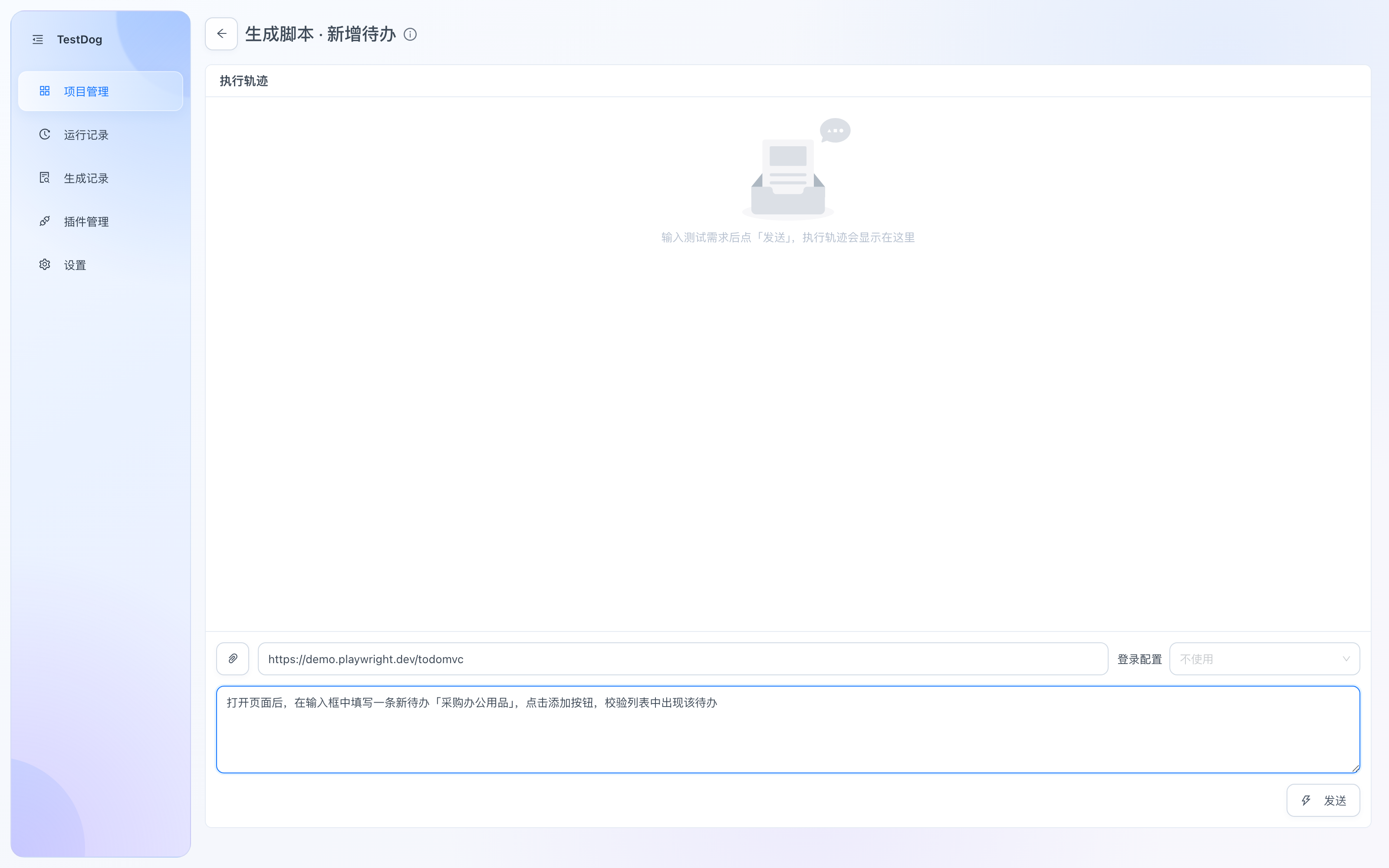
Describe the requirement, then click Send
The generation process
1. Step plan and test-intent confirmation
After you send, the model pre-splits a step plan and a test intent, shown together in one modal:
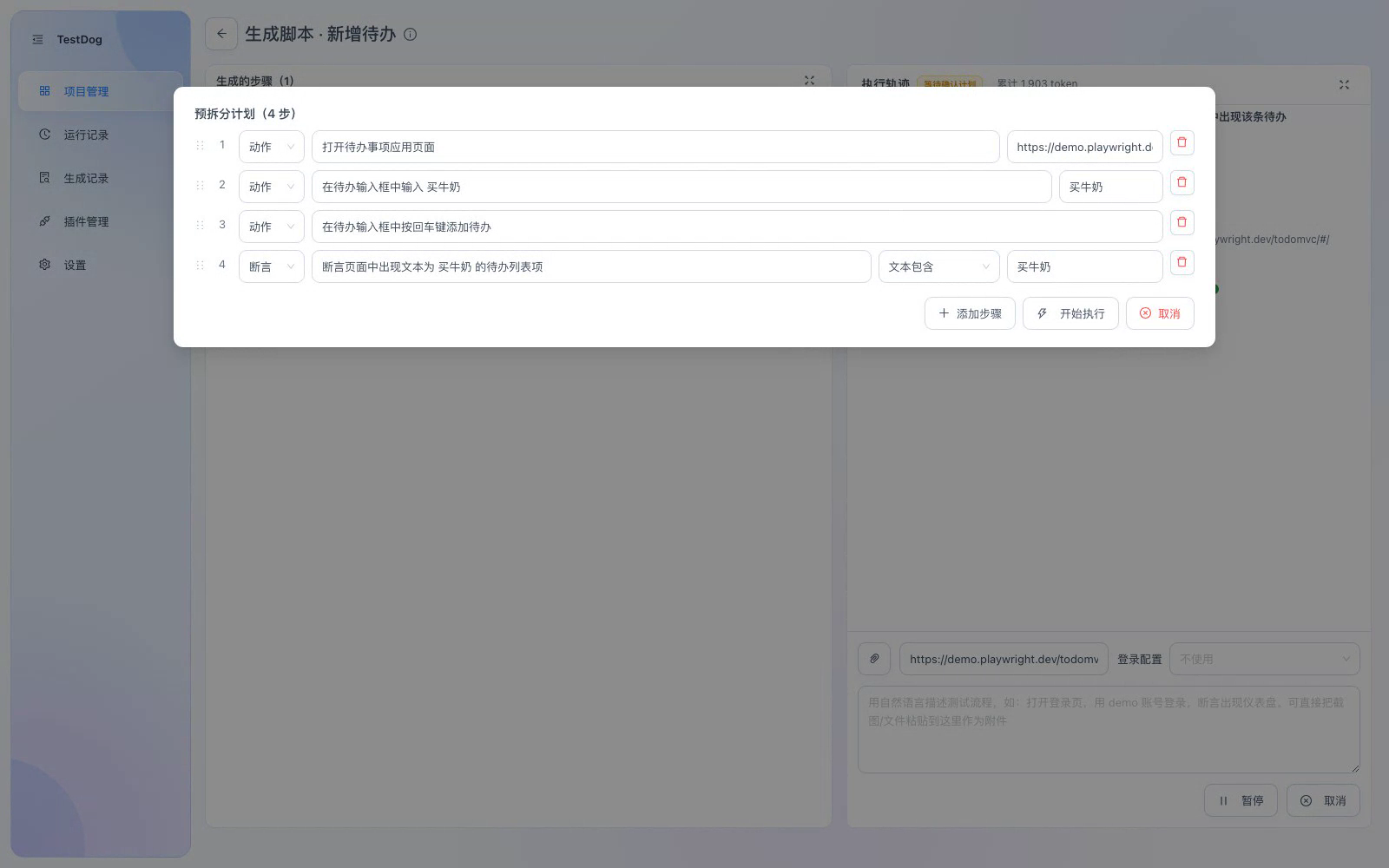
Confirmation modal: test intent & acceptance criteria on top, step plan below, then Start Execution or Cancel
Step plan: every step's action, params and assertion are editable; an assertion row can be linked to an acceptance criterion from a dropdown, which brings in that criterion's assertion type and expected value.
Test intent & acceptance criteria:
| Item | What it is |
|---|---|
| Scenario | Positive / negative / mixed |
| Objective | The business result to verify |
| Preconditions | Conditions that must hold before execution (one per line) |
| Data constraints | Field + value + policy: fixed (never auto-modified) or generated (supports |
| Acceptance criteria | Expected business result, verification scope (specific record / field), acceptance basis, required flag, assertion type & expected value |
| Cleanup | Cleanup actions after the run; leave empty if none |
After confirmation you start executing. The route can still adapt to the actual page, but the confirmed assertion types and expected values cannot be changed or weakened by the model.
2. Execution loop
Click Start Execution and a tool-calling loop runs in a real browser, streaming into the execution trail:
snapshotcaptures interactive elementsclick/fill/selectperforms clicks, typing and dropdown selectionassertruns strong assertions (see Assertion types); criterion assertions carry the criterion ID and target the agreed scoperead_coveragereads acceptance criteria and coverage status (no model call, no page interaction); coverage changes appear in the trailseevisual observation (requires vision capability)apiperforms API requests
In negative tests, illegal inputs, failed submissions and rejection assertions are kept as necessary steps — they are the test objective; fixed data is never replaced.
3. Write-back
Each successful action is parsed into a semantic locator into the "Generated Steps" table on the left (action / strategy / locator / params). You can pause or cancel at any time without losing finished steps.
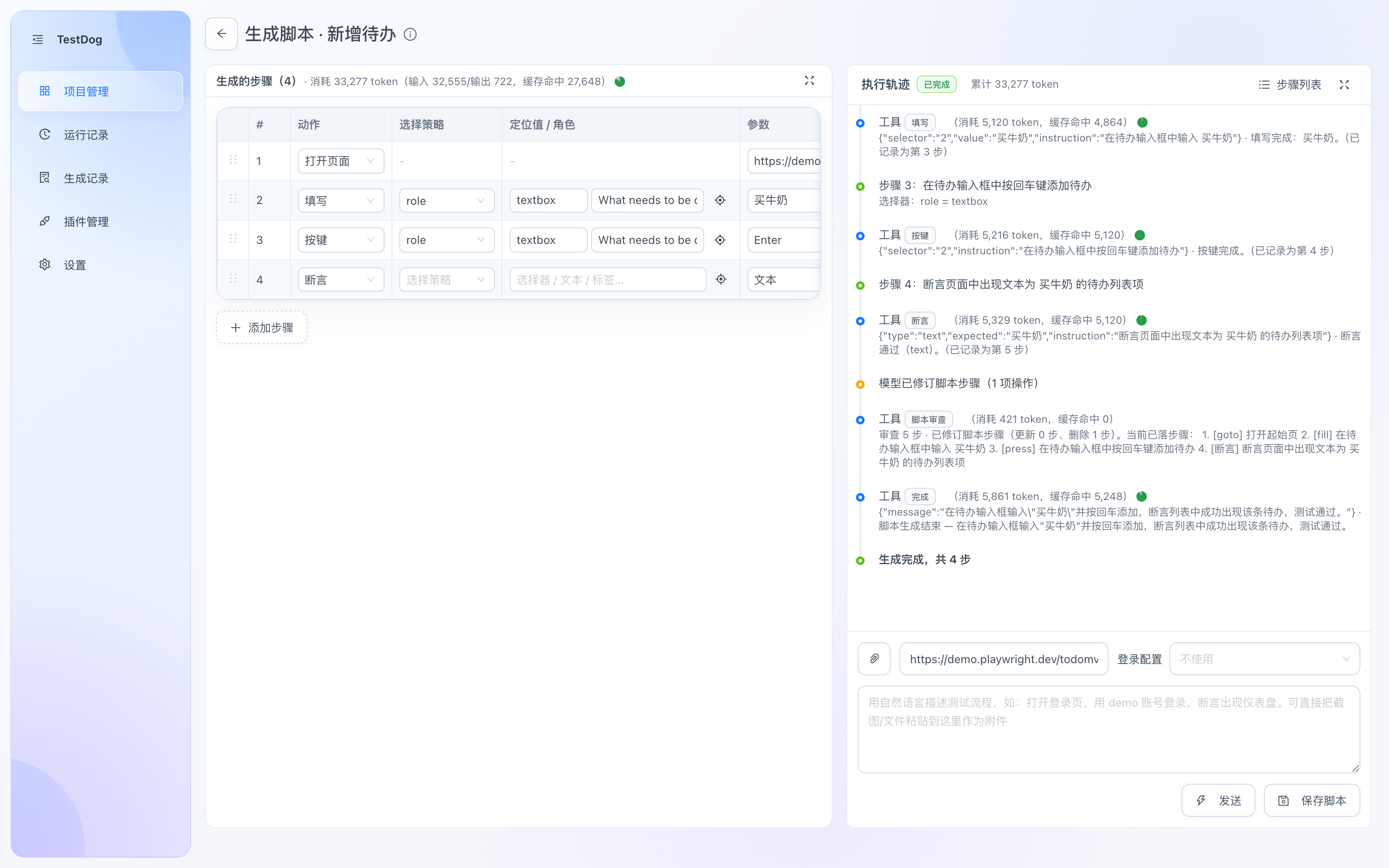
Generation finished: the trail shows each tool call with token usage (cache hits labeled); steps land in the table, ready to Save Script
Assertion types
Generation and replay share the same browser assertion semantics, retried within a timeout budget:
| Type | Meaning |
|---|---|
| visible / hidden | The unique target is visible / hidden or absent; multiple matches error out, not counted as hidden |
| text / text_exact | Visible text within scope contains / equals (whitespace-normalized) the expected text |
| value | Form field value equals exactly (empty string allowed) |
| checked / unchecked | Control checked / unchecked |
| enabled / disabled | Control enabled / disabled |
| count | Number of matching nodes (hidden nodes included, 0 supported) |
| url / url_exact | URL contains / equals exactly |
Criterion assertions verify that type and expected value strictly match the confirmed convention and must locate the agreed scope — a generic page-wide text or success toast cannot substitute for verifying the specific record.
Completion gate & evidence
- A criterion's
assertmust carry the criterion ID, strictly reusing the confirmed type, expected value and scope. - Only assertions that actually ran and passed (and were written back) register passing evidence; the model's summary or self-declaration does not count as verification.
- Changing locators, data, step order, or deleting related steps invalidates existing evidence and requires re-assertion.
finishrequires every required criterion to hold valid evidence and the script to end with an assertion; a re-check runs again after the global script review, so removing a key assertion during review cannot slip through.- Required criteria may be skipped to continue with the rest, but the run cannot be reported as fully complete.
No self-healing for assertions
Assertion failures do not trigger AI re-locating self-healing — a real defect must not be "healed" into a pass. Ordinary action steps retain locator self-healing; upload and scroll do not use generic AI self-healing.
Help requests
When the AI gets stuck locating an element, generation pauses and offers four options:
| Option | What it does |
|---|---|
| AI repair | Let the AI re-locate the element (consumes model calls) |
| Rephrase | Describe the action differently and retry |
| Manual takeover | Perform the step yourself in the browser |
| Skip | Skip the step and continue; if it was tied to a required criterion, that criterion stays unverified |
Pause and resume
You can pause generation at any time; Continue later resumes from the breakpoint — no re-run needed. Passed acceptance evidence is saved with the pause checkpoint and keeps counting toward coverage after resuming.
Where conventions live
Acceptance conventions are saved with the script version: after saving, view them via Test Intent & Acceptance Criteria on the case detail page, and they survive save-as-version, export and import. Older scripts without conventions keep working unchanged.
Generation logs
Every run is archived under Generation logs: step-level logs (tool calls, visual observations, help decisions) and token accounting are fully traceable, with automatic cleanup after the retention period. See Generation logs.
Uploading test files
Use the upload icon beside the attachment button (tooltip: “添加测试文件”) to save original files to the current project. These are separate from reference attachments used to explain the task: images are not compressed and document text does not replace the original bytes.
File tags appear above the input controls and wrap as needed. The × button removes a file from the selectable library while preserving resources used for replay and export. The button tooltip shows purpose, count and names; an empty library adds no tag row.
The generator uses list_files to obtain IDs and upload to select files. input mode targets a file input, including hidden inputs; chooser mode targets the upload button and includes the click. Up to 5 distinct files per action, 20MB per file; multiple files require a compatible control. Assert the business result after selection.
Saved steps reference project files and verify their integrity on replay. The step table allows changing files and upload mode. Single and batch .testcase exports include referenced original files; import verifies them, creates new project IDs and rewrites step references. Do not copy IDs alone between projects. Directories and pure drop zones without a file input/file chooser are unsupported.
Automatic test file cleanup
The server scans test-files at startup and every hour. Unreferenced files removed from the library, unreferenced files belonging to deleted projects, and incomplete writes are marked as orphaned first. They must remain eligible for 24 hours before their originals, metadata and markers are removed. Restoring a reference clears the marker and restarts the grace period.
Complete files still in a project library, files referenced by any saved script version, retained generation records, and in-memory checkpoints are protected. Deleting a script does not remove a file while a retained generation record still references it. Newly uploaded files remain available even before a script uses them.
Uploads, imports, exports, script saves, generation and replay defer the scan. The timer stops on shutdown. Failed reference queries prevent deletion; corrupt metadata and symbolic links are skipped. The server logs cleanup counts, bytes reclaimed and errors.
Scrolling
Choose scroll in the step editor or describe the required scroll during generation:
- Page: no locator; scroll by a distance, to the start or to the current end.
- Container: locate the actual scrollable region; choose horizontal or vertical scrolling. Snapshot annotations include
scrollable=x/y/xy, positions and dimensions. - Element: scroll an already mounted target into view, including its scrollable ancestors.
Relative distance is a nonzero number from -10000 to 10000 px; positive moves down/right, negative up/left. Reaching the current end does not prove asynchronous loading is complete. For virtual lists, scroll in bounded increments and inspect fresh state; ordinary clicks already scroll into view.
Generation and replay share the implementation. Parameters and stable locators are saved; changing them invalidates generation-time acceptance evidence. Repeated scrolling without movement participates in loop protection. Completed actions remain recorded when later observation fails. This is DOM scrolling, not a wheel-input test, and does not cross iframe boundaries.
Editing locator scope
Use the add-scope icon in the locator column to restrict the target to a parent container. Expand to edit strategy/value (plus role/name for role queries), use the scope picker to select the container, or collapse to a summary. Removing or picking scope preserves the target locator.
For example, locate the dialog named “Import customers”, then its “Confirm” button. The parent should be unique and the target must be in its actual DOM subtree. A portal menu attached to body may be visually inside a dialog but outside that scope.
Scope supports testid, role, label, placeholder, text, alt, title and css; no nested scope, xpath, response or websocket. Page scrolling has no locator; uploads and container scrolling can use scope. See .testcase fields.